Give the two kinds of work separate places
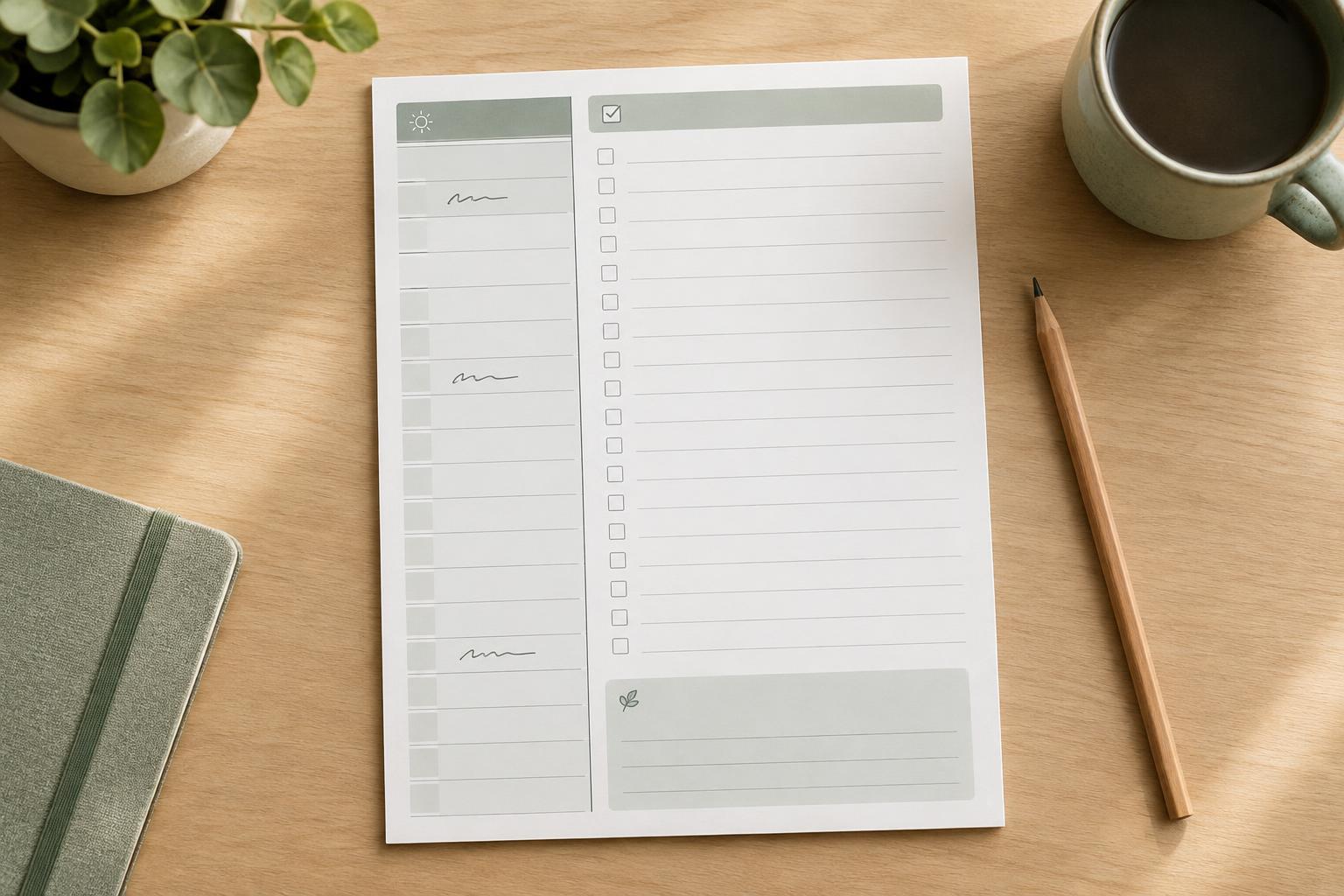
A daily planner has two different jobs. It needs to show where the day’s fixed commitments fit, and it needs to hold tasks that can be done whenever time is available. Mixing both into one long list makes it harder to see whether a task has a deadline, an appointment time, or simply a place on today’s agenda. A time-block column beside an open task area gives each kind of work a clear home.
Start by listing the information you actually use: a date, scheduled events, flexible tasks, and perhaps one small space for a top priority or reminder. Resist adding a tracker or prompt just because there is empty space. Every extra box reduces the room available for writing. Before drawing a polished page, make a rough sketch and fill it with a realistic day. If a typical entry feels cramped in the sketch, the finished layout will probably feel cramped too.
Build the time-block area around your day
The time-block area can run down the left side of the page, where it is easy to scan from morning to evening. Label the hours you are most likely to plan rather than automatically including an entire 24-hour cycle. If your schedule varies, leave a little blank space above or below the labeled hours for an unusually early or late commitment.
Choose a time scale that matches the way you plan. Hourly rows are simple and leave more space for notes; half-hour rows give more precision but can make handwriting tight. You can also use broad segments such as morning, afternoon, and evening if exact start times are rarely useful. Keep the ruling light enough to write over, and make sure each row has enough height for the size of pen and handwriting you expect.
Treat blocks as a map, not a demand to fill every minute. An appointment might occupy a specific row, while a broad block labeled “project work” can reserve time without prescribing every action. Leaving visible gaps also helps the page reflect breaks, transitions, and unexpected tasks.
Make the open task space genuinely usable
Place the flexible task area beside the timeline or directly beneath it. A side-by-side arrangement makes it easy to compare tasks with available time; a stacked arrangement may work better on a narrow page. In either case, give the task area enough width for a short action statement, not just a few words. “Draft introduction for slides” is easier to act on later than “slides.”
A simple heading such as “Tasks” is often enough. Optional checkboxes can help readers mark progress, but avoid packing the area with tiny preprinted lines if people may need to write longer items. You could reserve a small section at the top for one or two priorities, then leave the rest as open writing space. This separates what matters most from everything that would merely be nice to finish.
Tasks do not need a time block until there is a reason to assign one. A useful planning routine is to record fixed commitments first, list flexible tasks second, and then move only a few tasks into available blocks. That keeps the page readable even when plans change.
Use visual hierarchy without crowding the page
The date and major area labels should be easy to find at a glance. Use a larger or heavier type style for headings, then keep time labels and supporting text quieter. Consistent alignment does much of the organizing work: place hour labels in one straight column, begin task entries at a consistent position, and use spacing to distinguish sections.
For a printable page, test a draft at its intended size rather than judging it only on screen. Check that text remains legible, writing areas are comfortable, and important content stays clear of the edges where a printer may not print. Pale rules can keep the page calm, but lines that are too faint may disappear on an ordinary printout. If you use color, let it support the layout rather than carry essential meaning; labels and placement should still make sense in grayscale.
Test the layout with an imperfect day
A planner should accommodate changes, not only an ideal schedule. Fill a sample page with a meeting that moves, a task that takes longer than expected, and something that must be carried over. Notice whether you can cross out an entry, add a note, and still understand the page afterward. A small blank margin or notes area can be more valuable than another tightly defined box.
If the timeline stays mostly empty while the task area overflows, shrink the scheduled section and give more room to tasks. If appointments frequently run together, widen the timeline or simplify what you write in each block. The best division is not a universal ratio; it is the one that leaves enough space for your usual handwriting and your usual mix of scheduled and flexible work. Adjust the page after using it, rather than trying to perfect every detail before the first print.